


EL NORTE
3.9599.00 Reviews
App Specs
- Version
- 4.4.1
- Updated On
- License
- Free
- Downloads
- 100,000+
- Developer
- Grupo REFORMA
- Categories
- News & Magazines
- Platform
- Android
Screenshots



 Analysis by AppCompare
When I want a quick sense of what is happening nearby, a national headline alone does not always do the job. That is the reason I would consider EL NORTE: it is a news app from Grupo REFORMA, and its focus on the newspaper’s reporting makes it more useful to me than a general feed when local context matters. I would treat it as a companion to broader news sources, not a replacement for every perspective or every publication I read.
When a connection is part of the routine
Most of the experience depends on being able to reach the news. Browsing a section, opening a report, or following an unfolding story is naturally most convenient when my phone has a reliable connection. That makes the app a good fit for a regular check-in at home, at work, or during a connected break, rather than something I would rely on to answer every question while out of signal.
A practical habit is to open the app before a commute or appointment and check the stories I actually care about, instead of repeatedly refreshing a feed while moving between weak-coverage spots. If I am following a local issue, I can use that focused visit to understand what has changed and then return later when I have a better connection. It is a small adjustment, but it keeps a news check from becoming a frustrating loading exercise.
EL NORTE is free to install, though in-app purchases are listed from $2.49 to $169.99 per item. I would keep that distinction in mind before assuming every part of the reading experience is included at no cost: the free download is one thing, while any purchase is a separate decision. If I only want to sample the app, I would start with the available free experience and review any purchase prompt carefully before proceeding.
A local lens on a crowded news screen
Compared with a broad news aggregator, the main reason to choose this app is its connection to EL NORTE’s journalism, rather than the convenience of seeing many publishers in one stream. A general aggregator may be better when I want to scan several outlets quickly or compare how they cover the same event. This app makes more sense when the reporting from Grupo REFORMA is the point of the visit and local stories deserve more attention than a mixed national feed can give them.
That focus is also a limit. If I need a wide range of editorial viewpoints on a contentious story, I would read beyond one publisher instead of treating any single news app as the whole picture. Likewise, someone mainly looking for international coverage, entertainment browsing, or a personalized multi-source digest may be happier with an app built around those priorities. I see the strongest use here as following the issues and communities that this publication covers.
Useful in short mobile sessions
For a realistic everyday example, imagine checking the news over breakfast before deciding whether to take a different route or adjust plans for the day. I would open the relevant section, scan the headlines, and spend time only on a report that affects my plans. Later, I could return during a lunch break for a fuller read. That approach suits a phone well: it turns a long, unfocused scroll into two or three purposeful visits.
Worth Reading Before You Choose

EA SPORTS FC Mobile 26 Is a Bigger Football Game, but It Takes Time

Flipboard Shows What News Apps Must Do Beyond the Feed

Switching to Android Auto Means Rethinking Your Driving Routine

Google Calendar Makes a Crowded Week Easier to Manage

Ludo King Makes the Most of the Minutes Between Plans

Baby Panda World Brings Quick Play to Modern Phones, but Its Game Library Feels Busy
The same pattern works when a local development is moving quickly. I would check the app when I have a stable connection, read the report rather than relying on a headline alone, and revisit it later if the story remains important. Notifications can make breaking news easier to notice, but they are not a substitute for checking the full context. I would enable only the alerts I genuinely want, then adjust them if they interrupt work or family time.
What to do when loading falters
News apps are most frustrating when a page stalls just as I need an update. If that happens, I would first check whether other connected apps are working, then try the story again when the signal is steadier. This helps separate a temporary connection problem from an app-specific issue without repeatedly tapping the same item. For a time-sensitive situation, I would also consult another trusted news source rather than assume a delayed screen means there is no new information.
On a phone with limited storage or a tight data allowance, I would make news checks deliberate: use a reliable network when available, avoid leaving a stream open unnecessarily, and review purchase choices before confirming them. Those are sensible habits for any connected publication app, especially when I am trying to keep both interruptions and unexpected spending under control. I would not plan around reading without a connection; instead, I would arrange my reading for times when I can get online.
Who will get the most from it
I would recommend EL NORTE to readers who want a direct route to this publication’s coverage and who regularly follow local or regional developments. It may also suit someone who prefers opening a publication’s own app rather than discovering its stories through a crowded social feed. Readers who want one app to combine many outlets, who rarely have reliable mobile internet, or who prefer to avoid in-app purchase options should weigh those preferences before making it part of a daily routine.
The app is in the News & Magazines category, has an Everyone 10+ content rating, and has been available since April 15, 2010. Its current version is 4.3.9, and it requires Android 6.0 or later. Those details make it straightforward to check basic compatibility, while the audience rating is a useful signal for families deciding whether the content is appropriate for a younger reader. I would still read alongside younger users if a particular story raises questions, as news topics can vary widely.
Getting to Know EL NORTE
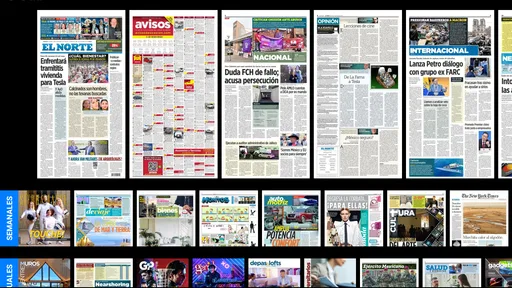
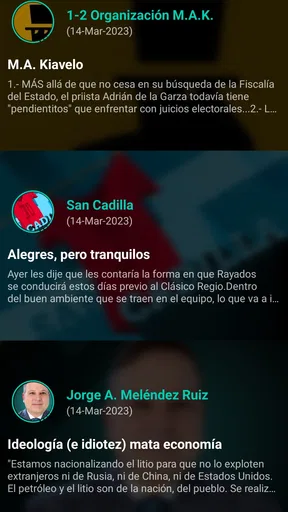
First things first, let’s talk about the interface. When I first opened EL NORTE, I was greeted with a sleek, straightforward design that's easy on the eyes. No overwhelming pop-ups or cluttered screens here! It’s just you and the news, which, let’s be honest, is a refreshing change.
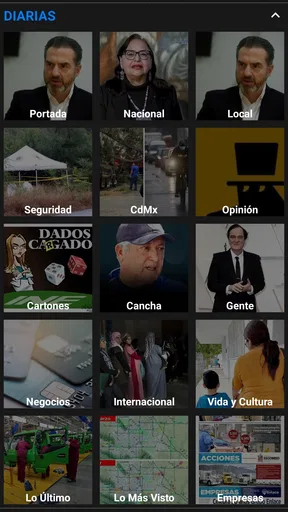
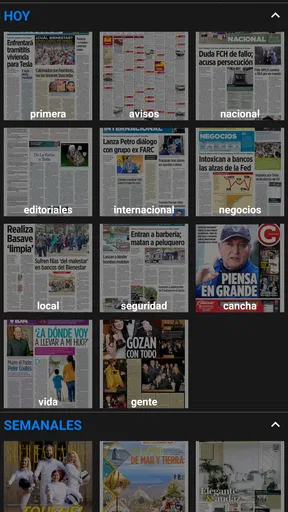
Navigation is a breeze. With a simple menu, you can hop between sections like national news, sports, entertainment, and more. The app loads quickly, which is a big plus when you’re on the go and just need a quick update.
Why It Stands Out
What truly makes EL NORTE shine is its local news coverage. If you’re tired of the same old international headlines, this app brings you closer to home with detailed reports and stories that matter to your community. It’s like having a finger on the pulse of your city.
Plus, the app offers a customizable experience. You can tailor your feed to focus on what interests you most. Just a few taps, and voila, your news feed is uniquely yours.
Features That Make a Difference
One feature I found particularly handy is the offline mode. Download articles to read later when you’re out of Wi-Fi range. Perfect for those long commutes or when you’re saving on data.
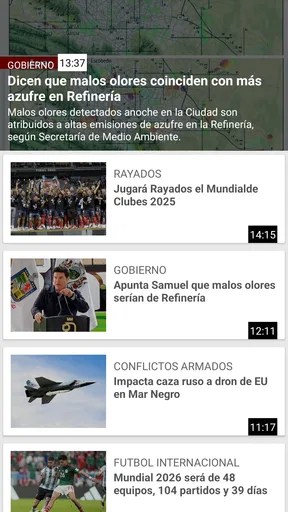
Another cool feature is the live updates. You can get real-time notifications for breaking news, so there’s no fear of missing out. It’s like having a news ticker in your pocket!
"The app’s simplicity and efficiency make staying informed a seamless part of your day."
The User Experience
Using EL NORTE feels intuitive. The developers have clearly thought about user experience, making it accessible to all age groups. Whether you’re tech-savvy or a bit of a novice, you’ll find it easy to get the hang of.
One thing to note, though, is to keep an eye on your notifications settings. The app can be a bit chatty, so tailor those notifications to avoid any disturbances.
Final Thoughts
All in all, EL NORTE is a solid choice for anyone looking to stay informed on the go. It’s not just another news app; it’s your personal news curator, keeping you updated with what matters most to you.
If you’re keen to dive into a world of well-rounded news coverage right at your fingertips, give EL NORTE a whirl. It’s like having the best of the news world in your pocket, ready to inform and engage whenever you are.
There is one important practical distinction to keep in mind: the earlier mention of offline reading and saved articles should not be treated as a reason to depend on the app when disconnected. I would verify that any story is actually available on my device before leaving a network, and otherwise plan to read it while online. This is especially relevant for travel, underground transit, and other situations where signal can disappear without warning.
Across app stores, EL NORTE has an average rating of 3.9 from around 2.7 thousand ratings, with about 600 written reviews and over 100 thousand installs. I take those figures as a snapshot of a reasonably established audience, not proof that every reader will find the same experience. My decision would come down to the publication’s relevance to me, how often I want its reporting, and whether a connected, publisher-focused app fits the way I read news.
Pros
- User-friendly interface with easy navigation.
- Real-time news updates keep you informed.
- Customizable notifications for preferred topics.
- High-quality images and multimedia content.
- Offline mode for reading without internet.
Cons
- Ads can be intrusive and disruptive.
- Requires a stable internet for best experience.
- Limited international news coverage.
- Some features are locked behind a paywall.
- Occasional app crashes on older devices.
FAQs for EL NORTE
What features does EL NORTE offer to its users?
EL NORTE provides users with up-to-date news, in-depth articles, and multimedia content covering a wide range of topics such as politics, economy, sports, and entertainment. The app also includes personalized notifications, offline reading options, and a user-friendly interface that makes navigation smooth and intuitive.
Is there a subscription fee for using EL NORTE?
EL NORTE offers both free and premium subscription options. While the free version provides access to a selection of articles and features, the premium subscription unlocks the full range of content, including exclusive articles and ad-free browsing. Users can choose a monthly or annual subscription plan.
How can users customize notifications in EL NORTE?
Users can customize notifications in EL NORTE by accessing the settings menu within the app. Here, they can select specific topics or categories they wish to receive updates on, ensuring they only get alerts relevant to their interests. Additionally, users can set the frequency and type of notifications received.
Does EL NORTE support offline reading?
Yes, EL NORTE supports offline reading. Users can save articles to read later without an internet connection. This feature is particularly useful for those who want to access content during commutes or in areas with limited connectivity. Simply save the desired articles to your device while online.
Is EL NORTE available on both Android and iOS devices?
EL NORTE is available for download on both Android and iOS platforms. Users can find the app on the Google Play Store for Android devices and the Apple App Store for iOS devices. The app is optimized for both systems, ensuring a seamless experience regardless of the device used.


